
Endpoints
You can integrate any external system with LDAS through the Endpoint.
Integration Mode refers to the method or protocol used to connect an external instrument or system to LDAS for data exchange.
There are two Integration modes through which we can integrate
- Rest API - It is used to connect to external system by giving the API connection details.
- Database Query - It is used to connect to external system by giving the query and details of the database.
Remote Agent Server and Agent Monitoring can be created as endpoint to access instruments remotely and monitor them upon failures.
The users can change the Endpoint status to Active or Inactive as per need.
You can access endpoint page from dashboard by using Settings option and clicking the Endpoint icon.
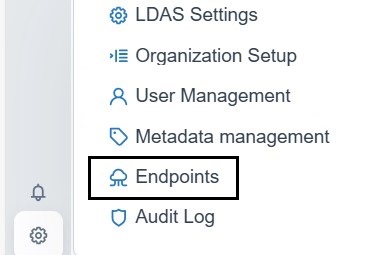
Settings
Creation of Endpoint for External system push
| Field Name | Description | Mandatory Fields |
|---|---|---|
| Name | Provide a name for the endpoint | Yes |
| Description | Provide a description for the endpoint | No |
| Type | Select ‘External System Push’ as endpoint type | Yes |
| Request URL | Provide the URL of the external API to which you are either pushing results from LDAS or retrieving results to LDAS. Select the appropriate method, such as GET or POST | Yes |
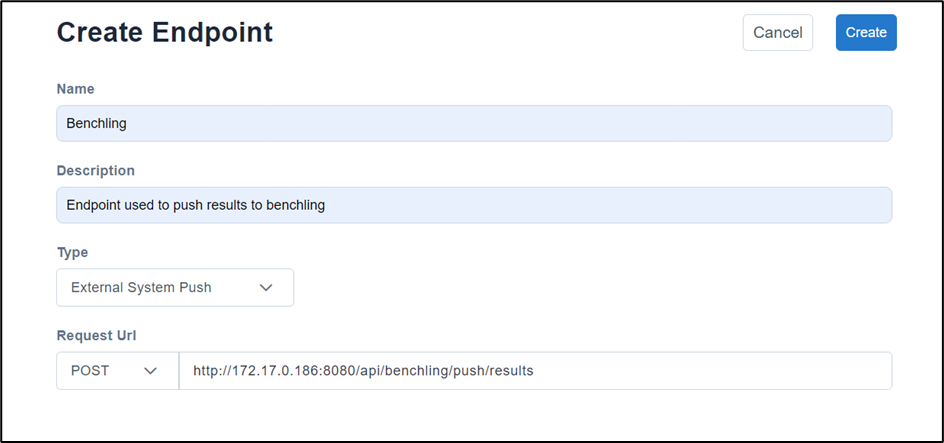
Example of create endpoint using External System Push
Creation of Endpoint - Rest API
| Field Name | Description | Mandatory Fields |
| Name | Provide a name for the endpoint | Yes |
| Description | Provide a description for the endpoint | No |
| Type | Select ‘Integration’ as endpoint type. | Yes |
| Integration Mode | Select REST API from the integration mode dropdown. Once chosen, this option cannot be edited | Yes |
| Parameterized | Select Yes/No from parameterized. By default, it is set as No | Yes |
| Select Method | Select the appropriate method, such as GET or POST | Yes |
| Request URL | Provide the URL of the external API to which you are either pushing results from LDAS or retrieving results to LDAS. | Yes |
| Header | Provide the key and value to the endpoint’s header. | |
| Key | Provide the name that identifies a piece of data | Yes |
| Value | Provide the information that the key is referring to | Yes |
| Add Row | If you want to add more key-value pairs, you can use the "Add Rows" option to create additional pairs. | No |
| Body | You can add the JSON body required for the API. | Yes, if ‘Post’ request URL is selected |
| Authentication | Provide the appropriate authorization required for the API, such as Auth, Basic Auth, or OAuth. | By default, selected as No Auth |
| Auth | You do not require any form of authentication for access. | |
| Basic Auth | You need to provide the username and password. | |
| OAuth | You need to provide the following:
|
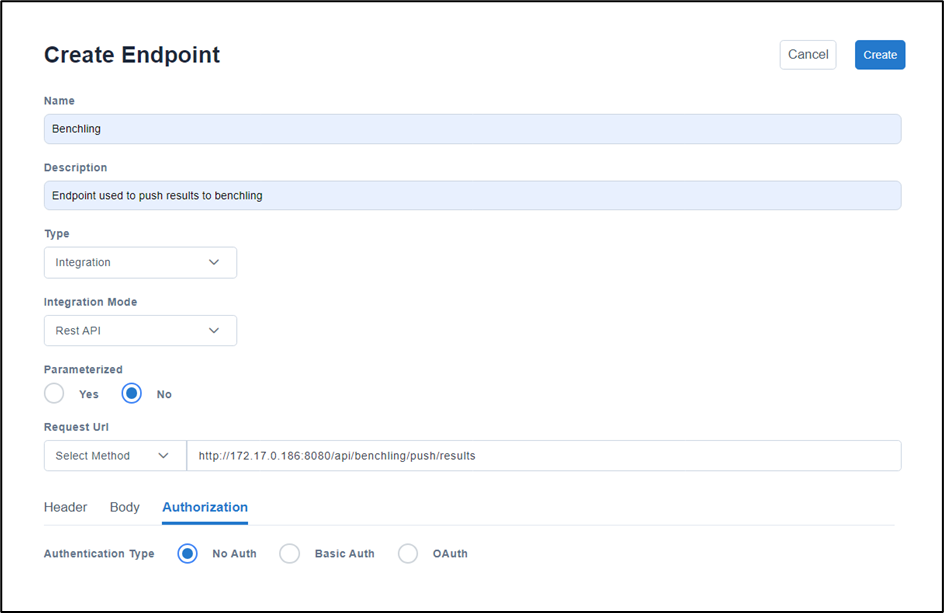
Endpoint Page for REST API
Creation of Endpoint – Database Query
| Field Name | Description | Mandatory Fields |
|---|---|---|
| Name | Provide a name for the endpoint | Yes |
| Description | Provide a description for the endpoint | No |
| Type | Select ‘Integration’ as endpoint type. | Yes |
| Integration Mode | Select Database Query from the integration mode dropdown. Once chosen, this option cannot be edited | Yes |
| Database Type | Select Postgres or Mongo as database. Once chosen, this option cannot be edited | Yes |
| Parameterized | Select Yes/No from parametrized. By default, it is set it as No | Yes |
| Database URL | Provide the URL of the database to which you can retrieve results to LDAS. | Yes |
| Database Name | Provide the name of the database | Yes |
| Username & Password | Provide the username and password of the database connection | Yes |
| Collection Name | Provide the Collection Name for Mongo Database | Yes, if Mongo Database is selected |
| Database Query | Provide the database query | Yes |
Creation of Endpoint – Database Query
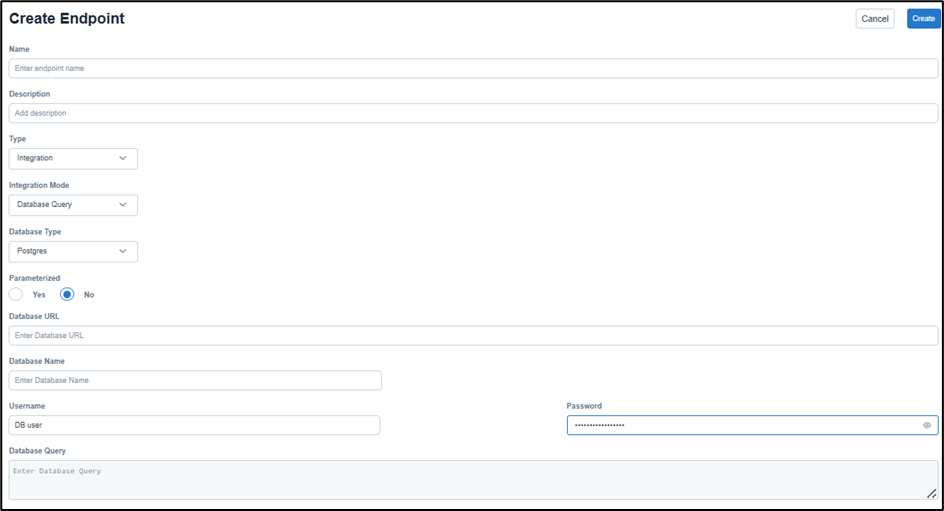
Endpoint Page for Database Query
Creation of Endpoint – Remote Agent Server
| Field Name | Description | Mandatory Fields |
|---|---|---|
| Name | Provide a name for the endpoint | Yes |
| Description | Provide a description for the endpoint | No |
| Type | Select ‘Remote Agent Server’ as endpoint type. | Yes |
| Agent Server URL | Provide the URL of the agent server to which you can retrieve results to LDAS. | Yes |
| File Directory | Provide the file path from where remote NiFi need to pick file. This is applicable while creating agent server for RS232 instruments | No |
Creation of Endpoint – Remote Agent Server
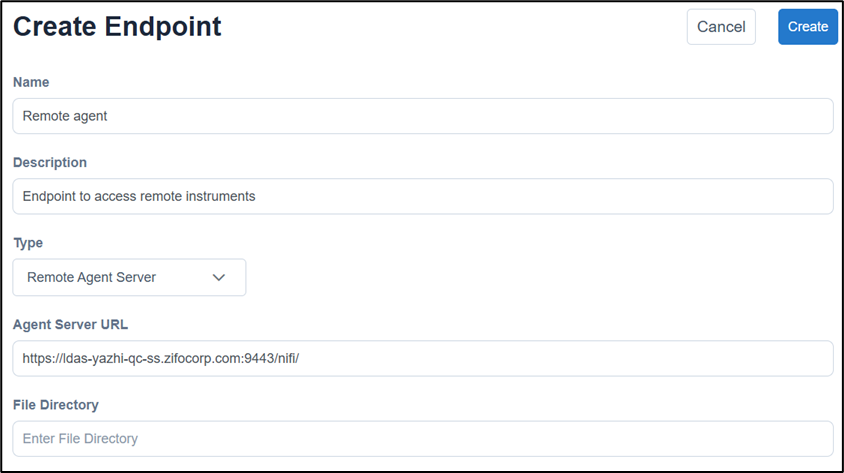
Example of create endpoint using Remote Server Agent
Creation of Endpoint – Agent Monitoring
| Field Name | Description | Mandatory Fields |
|---|---|---|
| Name | Provide a name for the endpoint | Yes |
| Description | Provide a description for the endpoint | No |
| Type | Select ‘Agent Monitoring’ as endpoint type. | Yes |
| Agent URL | Provide the URL of the agent for which you need to be notified upon failures | Yes |
| Authentication | Provide the appropriate authorization required for the API, such as No Auth and Basic Auth. | By default, selected as No Auth |
| No Auth | You do not require any form of authentication for access. | |
| Basic Auth | You need to provide the username and password. | |
| Monitoring From | Choose a location from where the agent needs to be monitored either from Local or Remote. | By default, selected as Local |
| Remote Agent Server | Select the Remote Agent Server which needs to be monitored, if agent needs to be monitored from Remote | Yes |
Creation of Endpoint – Agent Monitoring
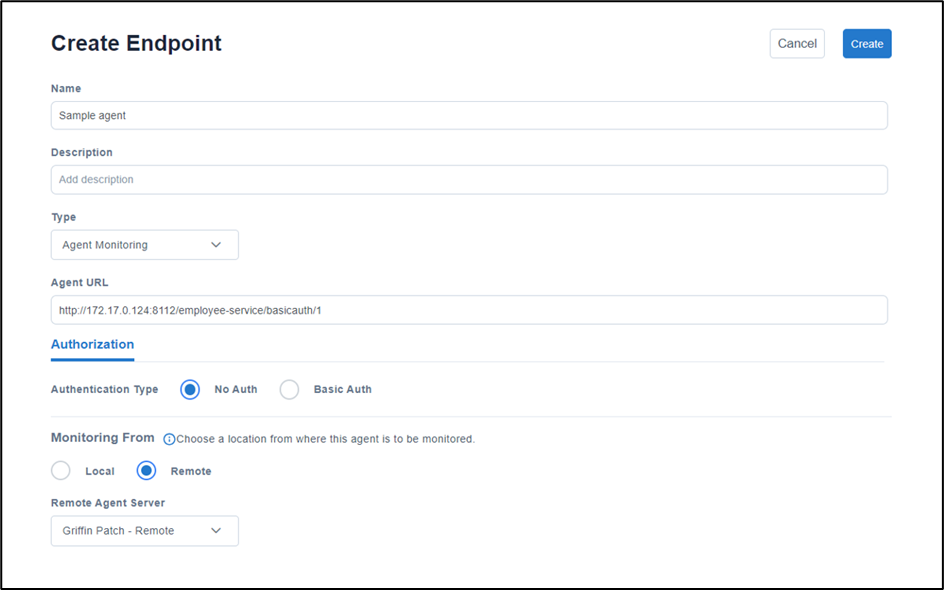
Example of create endpoint using Agent Monitoring
Updated about 1 year ago