
Admin Guide
This section details the actions a Workflow Admin can perform within the orchestration module, particularly after a workflow has been initiated. It also outlines the specific privileges required to execute these actions.
Roles and Permissions
To access the orchestration module, users with orchestration subscription must have one of the roles defined within LDAS, based on the level of access required.
| Permissions | Roles | |||
|---|---|---|---|---|
| Workflow Admin | Workflow User | |||
| View workflow | ✔ | ✔ | ||
| Cancel Workflow | ✔ | |||
| Rerun Workflow | ✔ | |||
You can be assigned specific roles within certain organizational paths, allowing you to perform actions according to your permissions in those paths or their child paths.
Rerun Workflow
If your workflow fails due to any technical issues and you need to rerun it, you can do so by clicking the Rerun option. You can perform bulk actions in the workflow list and re-run them as needed.
Cancel Workflow
If you want to stop an ongoing workflow permanently, you can cancel the workflow. You can perform bulk actions in the workflow list and cancel them as needed.
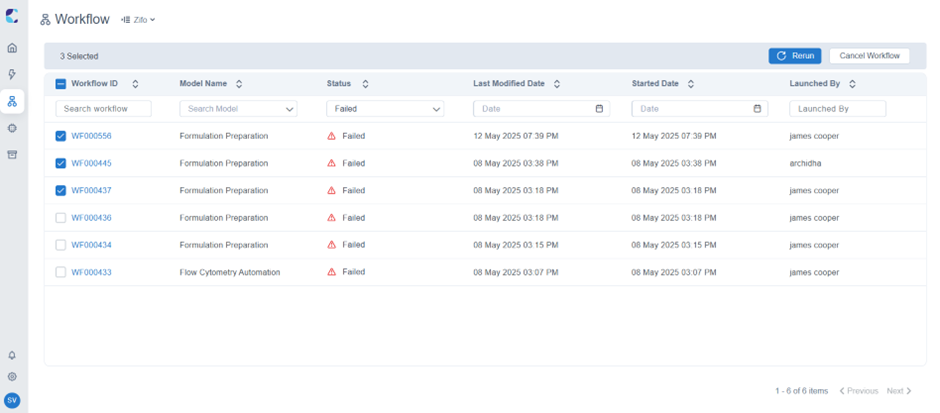
Bulk Re-run and Cancel Workflow
Updated 11 months ago