
Archival
The LDAS Archival module delivers an integrated framework for efficient management of scientific data within the AWS S3 cloud environment. Specifically designed for the scientific community, it meets regulatory standards and is GxP compliant, ensuring your data management is secure and compliant. This module allows you to store and manage data from instruments and applications along with metadata over the long term.
Archival offers both high-performance and low-performance storage options, allowing you to organize data based on how often it’s used. By keeping frequently accessed files separate from those that are rarely used, you can reduce storage costs over time. Additionally, metadata tagging, and advanced search features simplify locating and managing your data efficiently.
Key Terms
This section provides an overview of the terminologies used in Archival.
Storage containers: These containers hold archival files and folders, organizing the retention and movement of archival data. There are two types of storage containers namely primary storage and secondary storage.
- Primary storage
Primary storage includes high-performance containers where you can create folders and upload files. It also stores files from Instrument that are scheduled for automatic archival. You can enhance file organization using metadata tagging for easier search and retrieval.
- Secondary storage
Secondary storage is a low-cost backup container meant for projects that aren’t accessed frequently. This lower-performance option helps reduce storage costs by allowing you to schedule and move infrequently used files here. Ideal for long-term retention without compromising accessibility.
NOTEFiles cannot be uploaded directly to secondary storage, as it operates in read-only mode. Files and folders are automatically moved from primary storage to secondary storage once their archival period ends.
Archival Policy
The Archival Policy section defines the rules and conditions that guide how folders move through different phases of their lifecycle in the archival system. These policies apply only to folders—not individual files. The key elements included in an archival policy are:
End Date
The End Date signifies the completion date of the project associated with the folder.
Archival Period
The Archival Period specifies the duration for which the folder should be stored in primary storage.
Retention Period
The Retention Period defines how long an archived folder should remain in secondary storage before permanent deletion.
Archive Date
The Archive Date is the point in time when a folder is scheduled to move from primary to secondary storage. It’s calculated by adding the Archival Period to the folder’s End Date.
Deletion Date
The Deletion Date is when a folder is scheduled to be permanently removed from secondary storage. It’s calculated by adding the Retention Period to the folder’s End Date.
In LDAS, you can configure values for End Date, Archival Period, Retention Period, and Restore Period to control how long folders remain in Archival. Based on these configurations, other values like Archive Date, Deletion Date, and Restoration End Date are automatically calculated by the system.
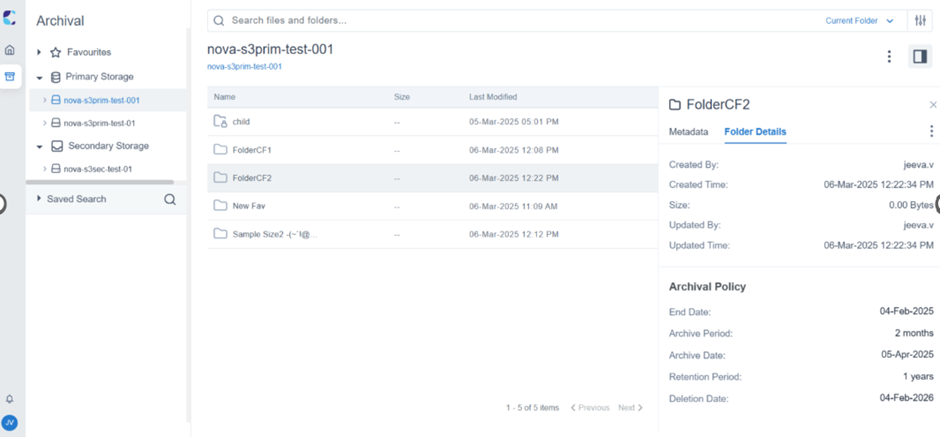
Example of Metadata Key and its Value
Archival policy can only be set at the folder level. You can define these values when creating a folder or update them later. While the folder is in primary storage, you can adjust its archival policy as needed. The policy values set for a folder will be inherited by all the folders and files inside it.
The diagram below will help you understand the archival policy,
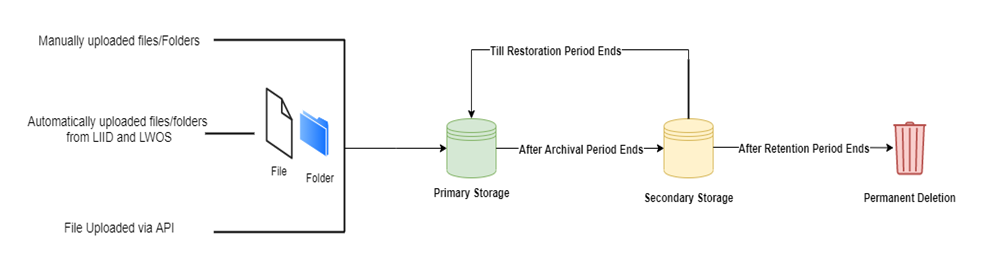
Archival Policy
NOTEChild folders can have a different archival policy than their parent folder. If a child folder does not have explicitly defined archival policy values, it will inherit the archival policy values from its parent folder.
Updated 11 months ago